hal0 can run a bundled agent — Hermes — provisioned into a
hal0-managed virtualenv and driven through the hal0 agent CLI. The agent
gets a persona (system prompt + tool gating), an approvals queue for
gated/destructive actions, and an optional per-persona spending budget.
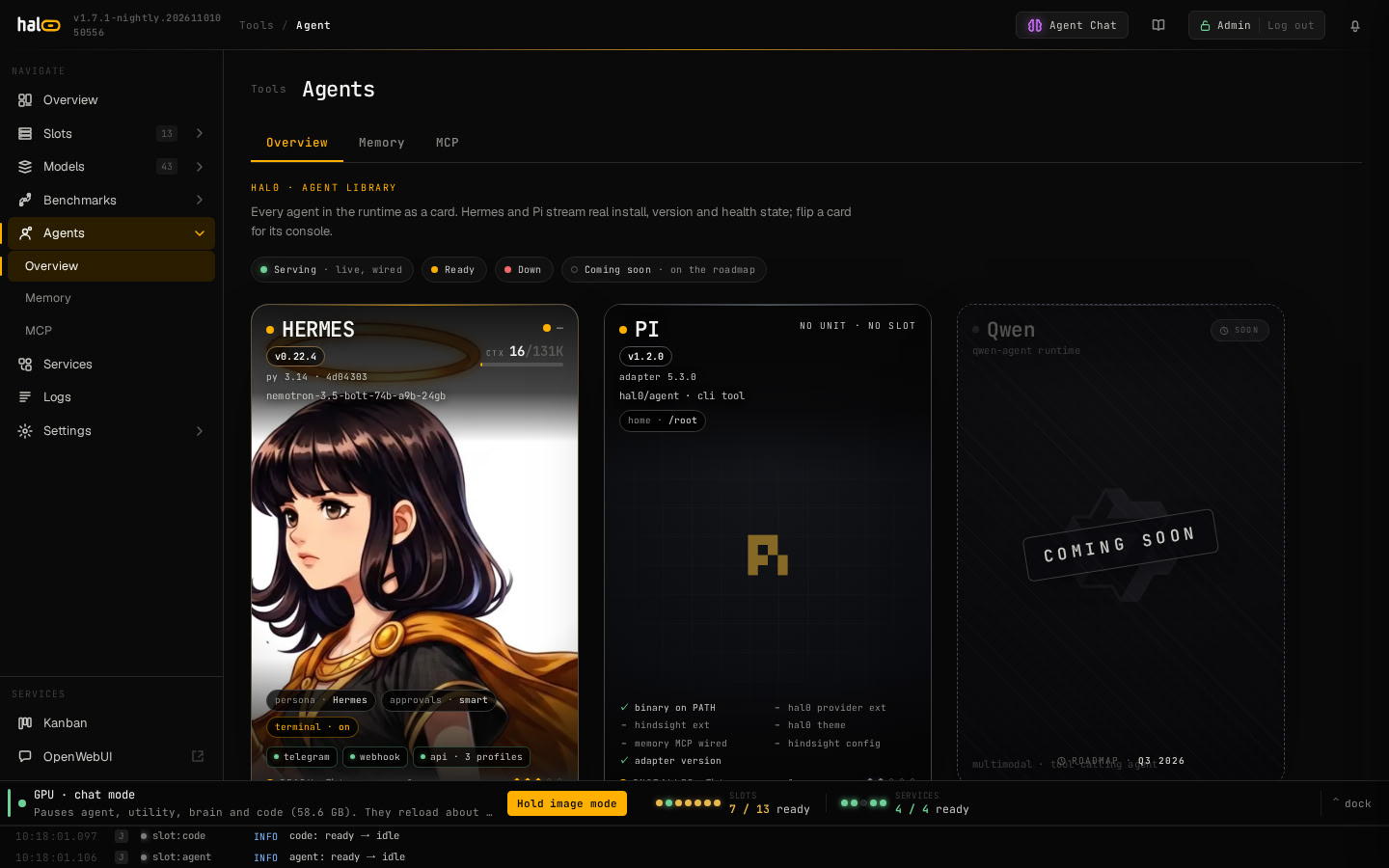
The Agents view
The dashboard’s Agents page draws every agent as a card. Hermes and Pi are
live cards that read the state of the box; flip one for its console, with the
controls to restart, upgrade, repair or uninstall Hermes. The
Agents view guide covers what each status shows,
the console tabs and how to read a degraded card.
Install Hermes
sudo hal0 agent install hermes
Installing Hermes runs a three-step foreground pipeline. First it ensures
the OS toolchain: git, plus python3 with venv and pip, and pipx. Then it
builds a Hermes release and registers the agent. Last, it enables and
starts the systemd unit (hal0-agent@hermes).
The Hermes release runs on Python 3.14. The uv that ships in hal0’s own venv fetches a managed CPython 3.14 under /var/lib/hal0/hermes/python/, so the first build needs the network. The interpreter order is a HAL0_HERMES_PYTHON override, then the uv-managed CPython, then a system interpreter that links SQLite 3.51.3 or newer. hal0’s own interpreter is never used. See the interpreter policy.
Run it as root: provisioning writes under root-owned /var/lib/hal0 and
then chowns the provisioned trees to the shared agent runtime user. As a
normal user it aborts cleanly up front with a sudo hint.
Pass --switch to uninstall the current agent before installing this one.
Hermes version, session history and linger
hal0 1.6.0 installs one reviewed Hermes release, v0.22.4 (4d043038). Moving from the previous pin (0.19.0) changes two things:
- Session history is kept. From 0.22, Hermes deletes sessions idle 90 days. hal0 writes
sessions.auto_prune: false, so nothing is
pruned. To prune, set
sessions.auto_prune: truein/etc/hal0/agents/hermes/overrides.yamland
runhal0 agent reprovision hermes. - The
hal0user lingers. Installing the Hermes gateway turns on systemd
linger forhal0. Hermes’s scheduled jobs and kanban workers run through
hal0’s systemd manager, which needs the linger.
hal0 doctor allreports it (hal0_linger);hal0 agent uninstall hermes
turns it off.
A Hermes model you pick is kept through reprovision --repair. To go back, run hermes config set model.default hal0/agent and hermes config set model.provider custom, then --repair.
hal0 update renders the gateway unit from hal0’s own template (the root verb hal0-update hermes-gateway) and turns linger on once the pinned Hermes release is live. It restarts the gateway only if it was running and never enables, starts or stops it, so a disabled gateway stays off. If that step fails, hal0 update, hal0 update status and hal0 doctor all print sudo hal0 agent install hermes; run it as the fix. It and the installer leave a disabled or masked gateway off.
The Hermes gateway and profile chat
From Hermes v0.22.3 the gateway daemon owns chat turns and the session store. The Chat tab of Hermes’s own dashboard still runs the default profile’s turns in the dashboard process and needs no gateway. A chat opened for another profile (for example hal0-brain) and the classic hermes chat CLI are gateway clients: they attach to hermes-gateway.service and report gateway inaccessible when the unit is masked, failed or stopped. To use them, run the gateway:
sudo systemctl enable --now hermes-gateway
With no messaging platform configured, the gateway serves only the API server and cron.
hal0 keeps the gateway unit file installed even when you turn the gateway off, because an installed unit in any state stops a client from starting a gateway of its own. The Hermes gateway unit row of hal0 doctor all fails when that file is missing, when a gateway run --idle-exit process is running (it names the pid and cgroup), or when a gateway.standalone: true profile has no unit of its own. To clear it, stop the stray process and run sudo hal0 agent install hermes; to keep the gateway off afterwards, sudo systemctl disable --now hermes-gateway. While the gateway is off, the hermes-api row warns instead of failing.
Dashboard token for Hermes Desktop
Hermes Desktop pairs with the Hermes dashboard in token mode. hal0 mints the dashboard session token once per install, stores it at /var/lib/hal0/state/agents/hermes/dashboard-session-token and hands it to the dashboard at every start, so a pairing survives restarts and hal0 update. Print it as root or the hal0 user:
hal0 agent dashboard-token hermes
The token is created the first time hal0-agent@hermes starts; before that the command exits 1 and says so.
Profiles and platform SDKs
Each named Hermes profile is wired to hal0’s hal0-admin and hal0-memory MCP servers (identity hermes__<profile>) at the profile_mcp_wire provisioning phase and on every hal0-api reconcile sweep. Hermes picks the change up on its own 60-second reconcile, so no restart follows. Opt a profile out with hal0: {wire_mcp: false} in its config.yaml. hal0 doctor all reports this on the hermes_profiles_mcp row and warns on hermes_generation when the live release lacks extras such as mcp. Each profile is also a model on hal0’s /v1; see Talking to Hermes.
A release build installs upstream’s extras for each messaging platform the box configures (for example Telegram, Discord and Slack), plus sms (aiohttp) because hal0 always enables the gateway API server. They install from upstream’s lock with hashes and are recorded as platform_extras in the release’s release.json. matrix is never added. If Hermes installs a platform lazily into its own environment, the next hal0 update or repair folds that extra into a fresh release.
Hermes’ terminal tool — off by default
Hermes ships without a terminal tool. It can read your box through the
hal0 MCP tools, but it cannot run shell commands unless you say so.
That is a deliberate default. The only terminal backend that works on a hal0
box is Hermes’ local one, which runs commands as the hal0 service user —
and on this box that user is root-equivalent (rootful podman plus the
hal0-systemctl / hal0-agentenv sudo wrappers). Hermes also reads content
it did not write: web pages, stored memories, MCP tool output. Turning the
tool on therefore means anything that can talk to your agent can, in
principle, get a root-equivalent command run on the machine.
There is no sandboxed middle ground. Hermes’ other backends are
docker | singularity | modal | daytona | ssh: hal0 ships podman rather than
docker, singularity is not installed, modal and daytona are paid cloud
services, and a containerised shell could not reach the host or the local API
on 127.0.0.1:8080 — which is exactly what the host-management skills need.
So the choice is on or off.
Turn it on when you want it:
sudo hal0 agent install hermes --terminal-tool     # opt in
sudo hal0 agent install hermes --no-terminal-tool  # opt back out
The installer also asks once, on an interactive install. A piped
(curl … | bash), headless, or HAL0_NONINTERACTIVE=1 install is never
asked and always leaves it off; set HAL0_HERMES_TERMINAL=1 to opt in
unattended.
Your answer is recorded at /etc/hal0/agents/hermes-terminal-tool, so
re-provisioning, --repair and updates all keep it. That file is root-owned on
purpose: it sits outside the agent’s own writable home, so nothing the agent
writes can present itself to a later provision as your decision.
hal0 agent status hermes prints the current posture on its own line.
Upgrades keep your setting. Every hal0 release that provisioned Hermes
wrote both terminal.backend: local and a terminal.cwd of its own — first
/etc/hal0, then $HERMES_HOME/scratch. An update recognises any of those
shapes, and any cwd you set yourself, as your answer and leaves the terminal
enabled. Only Hermes’ own untouched default (backend local with no cwd, or
cwd: ".", which hermes config migrate writes on a box hal0 never finished
provisioning) is not read as consent — those boxes start off, like a fresh
install. Run sudo hal0 agent install hermes --no-terminal-tool if you would
rather an upgraded box were off.
How off is enforced
From Hermes v0.22.3 the gateway’s preview-restart side agent is built with the terminal toolset on and ignores agent.disabled_toolsets, the list that switched the terminal off before. So with the terminal off, hal0 also writes terminal.backend: hal0-terminal-off in Hermes’s root config and in every Hermes profile it wires. Hermes rejects that backend in the terminal tool’s own availability check, which every agent in the gateway process shares, so terminal and process_manage leave every tool schema, side agents included. A cloned profile also gets terminal, code_execution and delegation added to its agent.disabled_toolsets, so execute_code and delegate_task go too.
If you chose a docker or ssh backend yourself, hal0 keeps it under hal0.terminal_backend_saved while the terminal is off and puts it back when you turn the terminal on; with nothing saved, turning it on restores local. hal0 update applies the gate to an existing box and restarts Hermes when it changed.
While tools are listed, Hermes logs Unknown TERMINAL_ENV 'hal0-terminal-off' at ERROR about every 30 seconds. On a terminal-off box that line is expected: it is the gate working, not a fault to fix.
What you lose with it off
These bundled skills drive the host through shell commands and stop working
when the terminal tool is off:
| Skill | What it does |
|---|---|
hal0-service-management |
Restart / inspect hal0 units and slot services |
hal0-bench |
Run benchmark sweeps against loaded slots |
hal0-bench-autopilot |
The weekly judgment pass over the benchmark dataset |
hal0-tune |
Apply and measure runtime/tuning parameter changes |
Hermes’ delegation toolset (delegate_task, which spawns subagents) goes off
with them. A subagent’s tools are chosen in the call that creates it and the
parent’s disabled toolsets are not inherited, so leaving delegate_task
reachable would let anything that can talk to your agent ask for a child
with a terminal — the shell you declined, one hop away. Turning the terminal
on brings delegation back with it. What you give up in the meantime is
parallel fan-out for subagent work that needs no shell; no bundled skill or
persona uses it.
Everything else — chat, memory, personas, the kanban board (its workers are
spawned by Hermes’s own dispatcher, not delegate_task), and the hal0 MCP tools
(slot state, model management, hardware readouts) — is unaffected: those go
through the hal0 API, not a shell.
Command approvals: smart or manual
With the terminal tool on, Hermes stops before a dangerous shell command or an
execute_code script and asks for approval. The command approvals setting
(Hermes’ own approvals.mode) decides who answers first:
- Smart (the default): a call to your
hal0/agentmodel approves the
command. If that call fails, or answers anything but APPROVE, Hermes falls
back to asking you. - Manual: you approve every flagged command yourself.
Switch it in the dashboard (Settings ▸ Security ▸ Hermes command approvals) or
from the CLI:
hal0 agent command-approvals          # show the setting and what is in effect
hal0 agent command-approvals manual   # always ask me
hal0 agent command-approvals smart    # let the approval model answer first
The change re-renders Hermes’ config and restarts hal0-agent@hermes if it is
running. If any step fails, the previous setting is restored and the command
reports the error. While the terminal tool is off, the setting has no effect.
This is not the approvals queue. That queue holds gated
hal0 MCP tool calls. Command approvals gate the shell commands Hermes runs.
The setting is stored as command_approvals in the [hermes] table of
/etc/hal0/agents/hermes.toml. That file is root-owned, so the agent cannot
change the stored setting, and a later re-provision always renders your choice
rather than one the agent wrote. An approvals.mode in
/etc/hal0/agents/hermes/overrides.yaml wins over the setting. The dashboard
and hal0 agent command-approvals then show the override’s value as the one in
effect.
If Hermes’ config.yaml no longer holds the value hal0 rendered, the dashboard
and hal0 agent command-approvals say so, and hal0 doctor all shows a
warning row. Pick the mode again (or, when overrides.yaml sets it, run
hal0 agent reprovision hermes) to re-apply it.
Caution: Known limits
The setting is not a boundary against an agent that has the terminal tool on.
- Hermes reads
approvals.modefrom its ownconfig.yamlunder
/var/lib/hal0/.hermes, which thehal0user owns, and the agent runs as
that user. With a shell it can edit that file directly (for example to
off) without any API call. This stays true after
ADR-0024. hal0 restores your choice
at the next re-provision, and the drift warning above is how you notice it
in the meantime. - Until ADR-0024 ships, agents authenticate with the box admin key, so a
Hermes agent with the terminal tool on can also call the admin API that
changes the setting itself, just as it can approve its own queued MCP calls.
The admin MCP tools never expose the setting, and the API refuses a request
that identifies itself as an agent, but neither stops a prompt-injected
agent with a shell.
Delegation slot
When Hermes hands work to delegate_task children, they run on the agent
slot by default, the same slot as the parent. On a single-parallel
llama-server the children then queue behind the parent. To run them on another
slot, such as utility, set delegation_slot in the [hermes] table of
/etc/hal0/agents/hermes.toml:
[hermes]
delegation_slot = "utility"
There is no CLI or dashboard writer for this yet, so edit the root-owned file.
The choice survives hal0 agent reprovision hermes, which renders it as
delegation.model = "hal0/utility". It is applied only while that slot is
ready. If the slot is down at provision time, nothing is rendered and a value
from an earlier run stays, so start the slot and re-provision.
hal0 doctor all warns while the chosen slot is not ready.
Manage the lifecycle
List / status
hal0 agent list                 # installed bundled agents
hal0 agent list --json
hal0 agent status hermes        # provisioning checkpoint, per phase
hal0 agent peers                # every published agent identity card
list only shows agents installed on this host; peers searches the
memory store for every identity card any host has published (needs the
memory API reachable).
Logs
hal0 agent log hermes
hal0 agent log hermes --phase provision
Per-phase provisioning logs — these are flat files under the agent’s
state directory, not a systemd journal. See
Logs and activity for how this differs
from a slot’s runtime logs.
Re-run / update
hal0 agent reprovision hermes          # idempotent re-converge
hal0 agent reprovision hermes --repair # force every phase, building a fresh release
hal0 update component hermes                       # build and activate a fresh release of the pin
hal0 update component hermes --target <sha>        # build a vetted commit other than the pin; stays until cleared
hal0 update component hermes --clear-override      # return to the pin
reprovision is a stable wrapper over the same state machine install
runs. Plain reprovision re-converges the agent, including its managed
virtualenv, so it is the command to reach for when the agent is running
but its MCP tools are missing. --repair forces every phase instead of
converging: it builds a fresh Hermes release, re-writes the persona seeds
and re-renders the config.
Every build lands in its own release directory under /var/lib/hal0/hermes
and is checked before anything switches. Activating it stops the agent and
the gateway (only the ones that were running), moves the current link,
runs hermes config migrate from the new release, starts the units again
and re-checks them. If that re-check fails, hal0 switches back to the
previous release and restores config.yaml by itself. A failed flip-back is reported as activation_failed. The plugin trees hal0 mirrors into $HERMES_HOME/plugins/ are re-synced on hal0 update and on a repair whose build fails, so a stale plugin manifest does not survive an update.
hal0 update component hermes --target takes only a full commit sha listed in
hal0’s vetted refs. A version string such as 0.15.3 or an ==X.Y.Z spec is
refused. The override persists across hal0 update until you run
hal0 update component hermes --clear-override, and hal0 update status shows
the row as overridden while it is set. If a later hal0 release no longer lists
that commit as vetted, hal0 update refuses to keep or rebuild it and names
--clear-override. The command also refuses a vetted commit older than the live release: once v0.22.4 is live, --target d923a5eb487a17c0a68801bba9ef0f56c81040a8 (v0.22.2) fails as a downgrade, because v0.22.3 and later write gateway runtime state into Hermes’s state.db that v0.22.2 cannot run over. The automatic flip-back after a failed activation is not affected.
To watch each phase as it runs, or to re-run provisioning without the
network, use the flags below. With --offline it never
builds: if a build is needed, the install step fails and names the step
that needs the network, and a running host keeps its live release. It is one linear pass: there is no
preview mode and no way to skip a phase, so it has no --dry-run or
--skip-phase.
hal0 agent reprovision hermes --offline
hal0 agent reprovision hermes --repair --verbose
To restart the running Hermes process without re-provisioning anything:
sudo systemctl restart hal0-agent@hermes
curl -X POST http://localhost:8080/api/agents/hermes/restart
Restart the Hermes gateway with sudo systemctl restart hermes-gateway, not
with hermes gateway restart or hermes gateway start. Upstream’s commands
regenerate the unit when it differs from what they would write, which turns
hal0’s stable /var/lib/hal0/hermes/current/ paths back into the paths of
one release under /var/lib/hal0/hermes/releases/<id>/. The gateway then
stays on that release when hal0 builds a newer one, and hermes gateway status
reports the unit as outdated. sudo hal0 agent install hermes regenerates and
normalises the unit again.
The Hermes card in the dashboard has buttons for restart, upgrade and repair:
Restart agent and Restart gateway on its Controls tab, and Upgrade
or Repair on its Lifecycle tab. See The Agents view.
Uninstall
hal0 agent uninstall hermes
hal0 agent uninstall hermes --keep-memory
Default uninstall tears down the agent’s private memory namespace too;
--keep-memory preserves it so a re-install reuses the identity card.
Uninstalling Hermes also runs loginctl disable-linger hal0, which undoes the
linger the Hermes gateway turned on. Run the uninstall as root for that step;
otherwise it prints the command to run.
The Hermes card also has an Uninstall button on its Lifecycle tab, behind a
type-to-confirm dialog. It has no --keep-memory option; see
The Agents view.
Update pi
If you installed the pi coding agent with sudo hal0 agent install pi, re-pin it without an uninstall:
sudo hal0 update component pi
Run it as root, the same way you installed pi. It reruns the pinned installer, redeploys hal0’s two extensions and refreshes the hal0-memory MCP entry, and leaves the extensions you added under ~/.pi/agent/extensions and your default provider, model and theme in settings.json alone. It refuses, and changes nothing, when pi is not installed, when pi’s profile is in a different home than the one it runs in (run it as the user who installed pi), and when settings.json or mcp.json is not a JSON object. hal0 update never re-pins pi; it only reports it.
A fresh hal0 agent install pi from a git checkout seeds a name-keyed banks alias in ~/.hindsight/coding-agent.json (coding-agent::hal0 to coding-agent::hal0-mono); the update adds it to an existing file and leaves every other key alone. Other Hindsight tools read that file.
Running hermes as root
Upstream hermes resolves its state from ~/.hermes, so a bare root
invocation would read /root/.hermes — an empty tree the agent never
uses — and commands like hermes mcp list would falsely report
“No MCP servers configured” on a healthy install. hal0’s hermes
wrapper prevents that: run as root, it re-executes as the hal0
service user (via the run-as-hal0 guard), so you see the same config
the running agent uses. If the guard can’t drop privileges, the
wrapper points HOME at the service home instead and prints which
~/.hermes tree it resolved on stderr. HAL0_ALLOW_ROOT=1 opts out
for deliberate root debugging — the wrapper then leaves root’s
environment alone but still names the tree it is reading. The
euid-aware fix inside the hermes CLI itself is an upstream
(NousResearch/hermes-agent) matter; the wrapper is hal0’s seam.
Personas
A persona is a TOML file pairing a system prompt with tool gating:
hal0 agent personas list                 # list + mark the active one
hal0 agent personas show <id>            # print a persona's TOML (good template)
hal0 agent personas activate <id>        # switch the active persona
Activating writes the active pointer atomically, renders the persona’s prompt
into Hermes’s config.yaml as agent.system_prompt. Hermes re-reads that file
without a restart: new sessions and the next gateway turn use the new prompt,
while a dashboard chat that is already open keeps the old one until you start a
new chat. The same happens when you edit the active persona in the dashboard
(or PUT /api/agents/hermes/personas/<id>); editing a persona that is not
active changes nothing in Hermes until you activate it. Switching persona does
not touch named Hermes profiles (coder, homelab, research). The command
prints what was and was not applied. If the config could not be written (the
command was not run with enough privilege to write the Hermes config), the
pointer still moved but the prompt is not live; run
sudo hal0 agent reprovision hermes --repair to apply it. --no-apply only
moves the pointer. An agent.system_prompt in overrides.yaml wins over the
persona prompt.
tools_allowed and preferred_model are steward-only. Only the hal0-brain
persona enforces them; Hermes ignores both, so the dashboard editor and
personas show hide them for every other persona. To author your own, copy
personas show output, change the persona id, and save it under the persona
store.
Connect accounts for OAuth skills
Skills that act on a third-party account (Google Workspace, Spotify, GitHub) need an OAuth grant, which hal0 runs itself. See Connect accounts for OAuth skills.
The approvals queue
Destructive or gated tool calls don’t execute immediately — they land in
an approvals queue you review. This queue covers hal0 MCP tool calls; the
shell commands Hermes runs are gated separately by
command approvals.
hal0 agent approvals list                # pending requests
sudo hal0 agent approvals approve <id>   # let it run
sudo hal0 agent approvals deny <id>      # reject it
Deciding needs root or a dashboard session, not an API key
(who can decide).
Each pending row shows the request id, the tool, the requesting agent,
when it was enqueued, and a one-line summary of the primary argument. The
dashboard’s Agent → Approvals tab renders the same queue. See
Connect MCP servers for the full list of
gated admin tools.
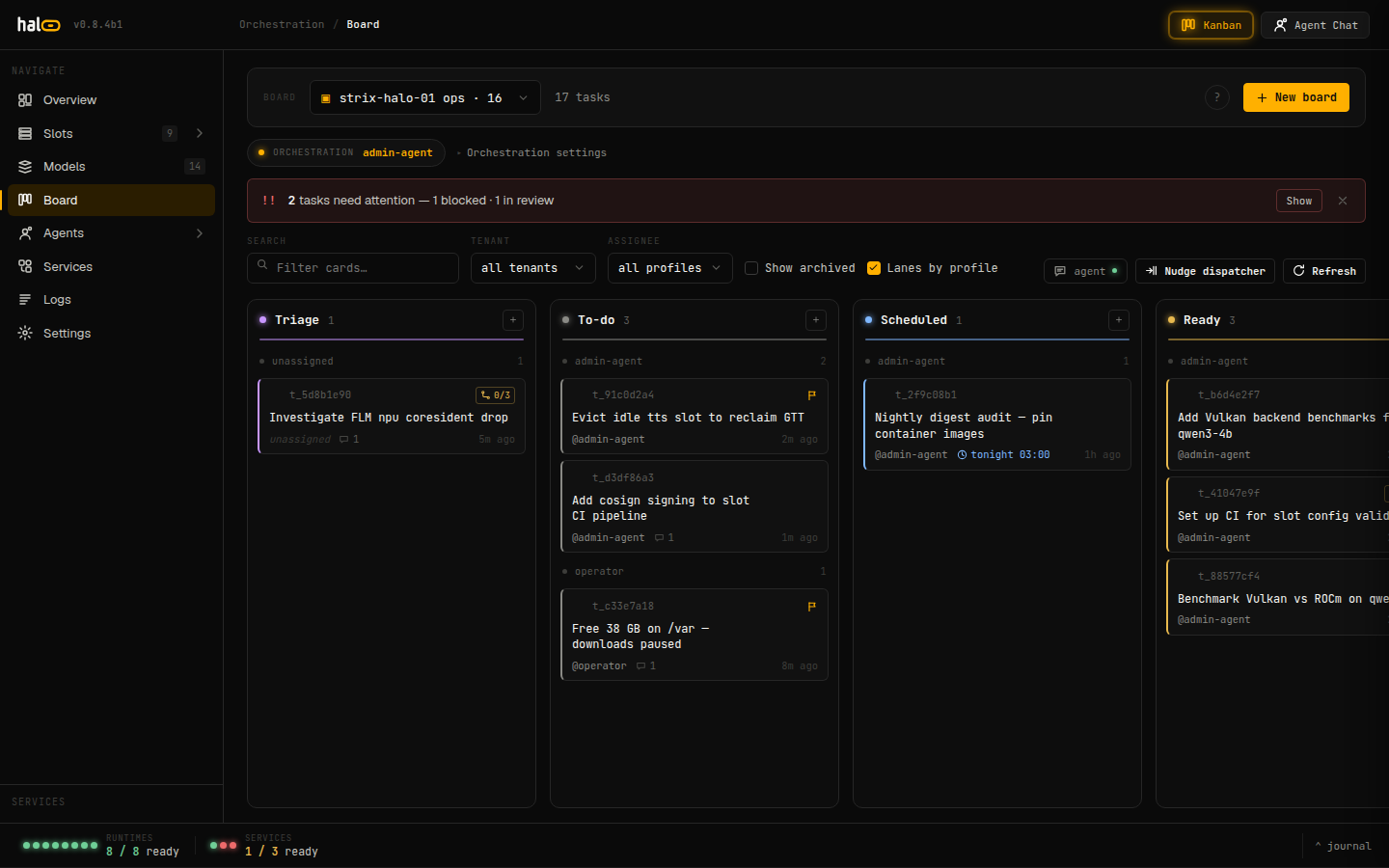
The Operator Board (dashboard ▸ Board) — the Hermes kanban, proxied through hal0-api; agent tasks move across Triage → To-do → Scheduled → Ready lanes. With no Hermes agent installed the page shows an install prompt, and the API answers
board.not_installed, board.unreachable or board.no_token (503).
Spending budget
Each persona can carry spending caps so an autonomous loop can’t drain a
paid provider pool. Caps live in the persona’s [persona.budget]
sub-table:
[persona.budget]
daily_usd = 5.0
monthly_usd = 50.0
lifetime_usd = 200.0
per_call_max_usd = 0.50
hard_cap = true
Every cap is optional — omit one to leave that window uncapped, or set it
to 0.0 to block every paid request. hard_cap = true (the default)
denies requests that would overshoot; hard_cap = false lets them
through but still reports the breach.
curl http://localhost:8080/api/agents/hermes/personas/hermes/budget
The same route accepts a PUT with a {"daily_usd": ..., ...} body to
change the caps without hand-editing the persona TOML.
Chatting directly
Outside of Hermes’s own agent loop, hal0 chat is a terminal REPL over
the local /v1/chat/completions endpoint, defaulting to the agent
model alias. It supports /think on|off|default as an in-REPL command
and --no-stream for non-streaming output.
Open WebUI and any other OpenAI-compatible client can chat with each Hermes profile directly through hal0’s /v1; the old agent chat proxy is removed. See Talking to Hermes. Hermes’s own dashboard (its Chat tab) is the place for full sessions; a chat there for a profile other than the default needs the gateway running (see The Hermes gateway and profile chat).
Audit trail
Every gated tool invocation is journaled. Pull an agent’s recent MCP
activity:
curl 'http://localhost:8080/api/agents/hermes/activity?limit=50'
Each row carries tool, args, gated, outcome, timestamp, and the
client_id the action was attributed to.
When the agent has no memory tools
An otherwise healthy Hermes that answers chat but cannot recall anything
usually has a broken MCP client rather than a broken memory service. There
are two independent causes, and both are repaired automatically now.
The first is the wiring: the X-hal0-Private header has to be a YAML
string, and a version that wrote it unquoted left the client unable to
connect. The second is the managed virtualenv itself. A venv that drifted
off its vetted pin — no mcp package installed at all — used to survive
every upgrade untouched, because nothing outside provisioning re-converges
the venv and hal0 update never provisions. The symptom is a client that
fails to import with mcp.client.streamable_http is not available while
the config header reads correctly.
hal0 update now checks both on every upgrade and repairs what it finds.
A venv repair builds a fresh release of the live commit and activates it,
switching back on its own if the result does not check out. Verification
is a re-probe of the import, not the installer’s exit code, so a repair
that silently produces an unusable venv is reported as a failure rather
than a success. If a repair cannot run — no venv on the box, no network,
another build holding the builder lock — the update logs the fault and the
remedy and carries on rather than failing; the next update retries.
hal0-api also probes this on every start, including crash-restarts, but
that path only diagnoses: it will not build during the startup of a box
that is already unhealthy. It logs the remedy, and the next real update
performs the repair.
To fix a box by hand:
hal0 agent reprovision hermes           # re-converges the venv; usually enough
hal0 agent reprovision hermes --repair  # builds and activates a fresh release
Related
- Enable memory — the recall store agents
read and write. - Connect MCP servers — the admin tool tiers
and the approvals flow. - Delegate work to the Hermes agent — let a
remote coding agent run tasks on Hermes through a bridge key. - Connect external providers —
wire the paid upstream a budget caps spend against.