With a model pulled and assigned to a slot, you can chat through the
prewired web UI or directly against the OpenAI-compatible API.
With OpenWebUI
hal0 installs and prewires OpenWebUI, which binds port 3001 and
points at the local hal0 API out of the box.
-
Make sure the OpenWebUI unit is running:
systemctl status hal0-openwebui -
Open
http://localhost:3001(orhttp://hal0.local:3001) in your
browser. -
Pick your model from the model selector and send a message.
With curl
The API is OpenAI-compatible at http://localhost:8080/v1. Use a slot
name (e.g. agent) as the model id — hal0 rewrites the slot alias to
the slot’s configured model before dispatching, so you don’t need to know
the underlying model id.
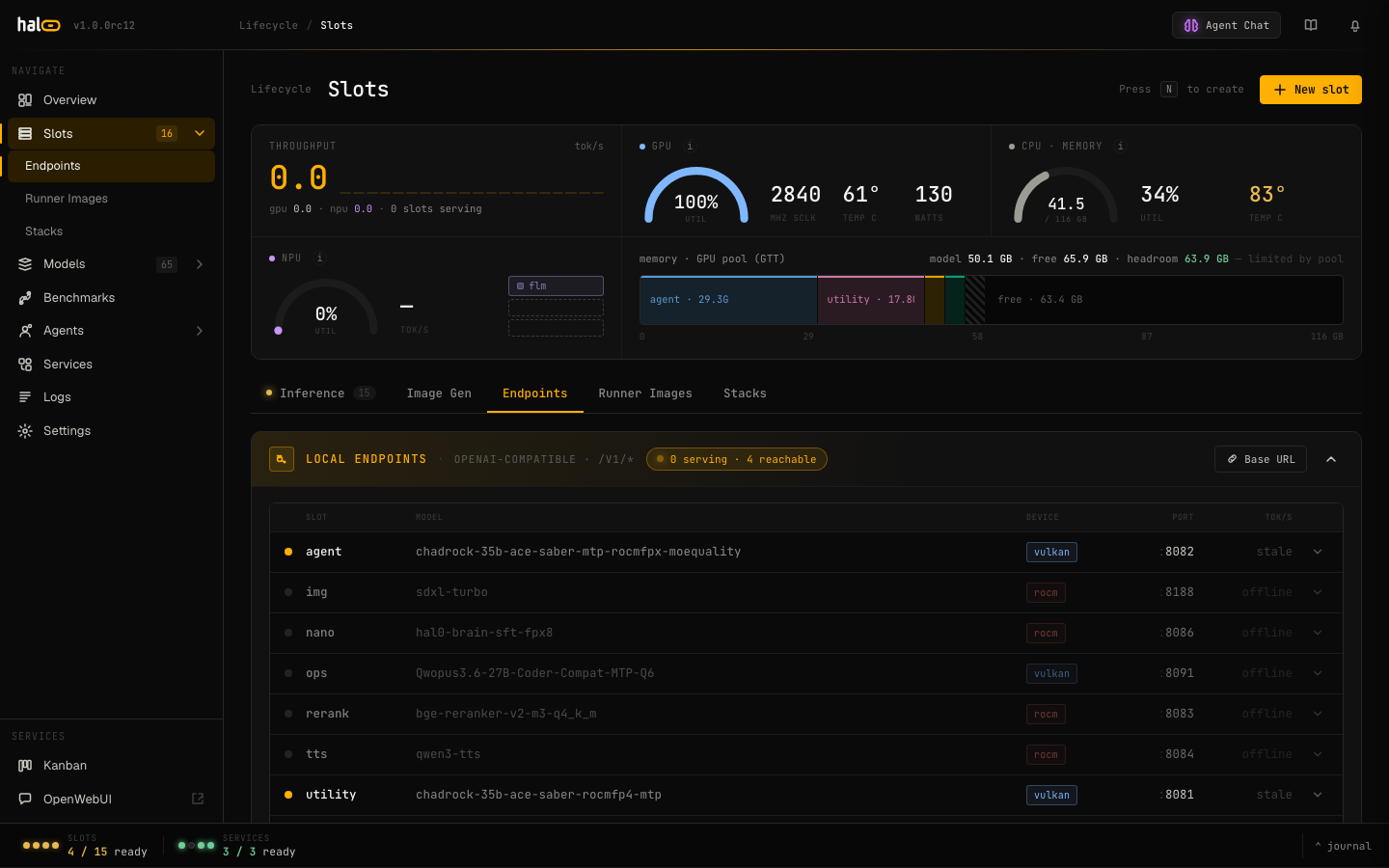
The Endpoints tab — local OpenAI-compatible slot endpoints and slot-as-model aliases.
Non-streaming
curl http://localhost:8080/v1/chat/completions \
  -H "Content-Type: application/json" \
  -d '{
    "model": "agent",
    "messages": [
      {"role": "user", "content": "Say hello in one sentence."}
    ]
  }'
Streaming
curl http://localhost:8080/v1/chat/completions \
  -H "Content-Type: application/json" \
  -d '{
    "model": "agent",
    "stream": true,
    "messages": [
      {"role": "user", "content": "Say hello in one sentence."}
    ]
  }'
The response is a Server-Sent Events stream of OpenAI-shaped chunks.
Tip: Slot aliases
hal0’s two canonical seeded roles are agent (the capable default, and
the fallback anchor for every other role) and utility (a cheaper model
for lightweight/background work). Both are valid model ids, as is the
name of any other slot you’ve created yourself. The legacy alias
agent-hermes still resolves to agent; chat and primary were
retired as slot names/aliases. Passing the underlying model id directly
works too, and so do the live-resolving virtual names hal0/agent,
hal0/utility, and hal0/npu.
No Authorization header is required — hal0 ships with no built-in auth
and treats the local network as trusted (front it with a reverse proxy if
it is exposed). You can point any OpenAI SDK at the same base URL:
from openai import OpenAI

client = OpenAI(base_url="http://localhost:8080/v1", api_key="not-needed")
resp = client.chat.completions.create(
    model="agent",
    messages=[{"role": "user", "content": "Hello!"}],
)
print(resp.choices[0].message.content)
Beyond chat
The same /v1 surface exposes embeddings, rerankings (also reachable
at rerank, for clients that expect llama-server’s / Jina/Cohere-style
native path), audio/transcriptions, audio/speech, and
images/generations — each routed to the appropriate slot. GET /v1/models lists everything the configured slots and upstreams
advertise.
- Run agents: Point Hermes or Pi at the agent slot for tool-calling and coding workflows.
- Enable memory: Turn on conversational memory so hal0 recalls context across sessions.