hal0 doesn’t build its own agent runtime — it bundles one, and hal0’s job
is to run it safely: as a sandboxed service, shaped by a persona that controls
what it can do, with a human in the loop for risky actions and a spending cap
for paid calls. A second, distinct piece — the hal0-brain steward, hal0’s
own resident model that chats and drives hal0’s own admin tool catalog — sits
alongside it and shares the persona, approval-queue, and memory machinery
described on this page. The two are easy to conflate; they aren’t the same
thing, and the steward has its own concept page: see Brain.
Hermes: the bundled agent runtime
Hermes is hal0’s bundled, sandboxed agent runtime —
BUNDLED_AGENTS = ("hermes", "pi"). Earlier speculative bundles (pi-coder,
opencode) were removed before v1.0; the codebase still carries the machinery
to install-by-shelling-out to installer/agents/<name>.sh the way those did,
and pi (below) is the bundle that now uses that path.
The agent runs as a systemd template unit, hal0-agent@<id>.service (so
Hermes is hal0-agent@hermes). It runs as the unprivileged hal0 system
user the installer creates, under a tight sandbox: no new privileges, a
read-only system with only hal0’s own directories writable, a private temp
dir, and a watchdog. Crucially, the agent’s secret files stay root-owned and
unreadable to the hal0 user, so the agent can’t read its own credential
store even though it can write to hal0’s data paths.
hal0 pins Hermes to one reviewed upstream release, v0.22.4 (commit
4d043038), the pin since hal0 1.6.0. Every build (install, repair, upgrade, and the
converge pass of hal0 update) produces an immutable release under
/var/lib/hal0/hermes/releases/<id>/ on a uv-managed Python 3.14, installed
from upstream’s hash-locked uv.lock and checked (imports, hermes --help, an
MCP probe) before the current link moves. /var/lib/hal0/venvs/hermes is a
symlink to current/venv. Activating a release stops the agent and gateway,
switches, runs hermes config migrate and restarts them; if the re-check
fails, hal0 switches back to the previous release and restores config.yaml.
A release also carries the SDKs for the messaging platforms the box configures
(Telegram, Discord, Slack and others). Two Hermes behaviours are set on purpose:
- Session history is kept. Hermes 0.22 deletes ended sessions after 90
idle days unless told not to. hal0 writessessions.auto_prune: false, so
no history is pruned. - The
hal0user lingers. The Hermes gateway turns on systemd linger for
hal0, because Hermes’s scheduled and kanban workers run under that user’s
systemd manager.hal0 doctor allshows the linger state, and uninstalling
Hermes turns it off.
The pin only moves forward. hal0 update component hermes --target takes only a
vetted commit and refuses to build an older vetted release over a newer one’s
state.db, because the gateway’s persisted runtime state would then run under
a release that predates it. Once v0.22.4 is live, a request for the older
vetted v0.22.2 build is refused as a downgrade. That older commit stays
vetted so the automatic flip-back to the previous release when a new one fails
its start check, and a box still on it, keep working.
The agent process binds to loopback only. Chatting with Hermes happens in
Hermes’s own dashboard (its Chat tab), which the hal0 dashboard links to once
HAL0_HERMES_PUBLIC_URL is set; hal0 does not proxy it. The old agent chat
proxy (/api/agents/{id}/events, /submit, /session/*) is gone and those
paths return 404. The agent reaches
hal0’s own inference and admin surfaces through environment hal0 writes for
it (the API URL and the admin/memory MCP URLs).
Hermes Desktop can pair with that dashboard remotely (token mode, through
whatever reverse proxy you put in front of it). The token it stores is the
dashboard’s session token, which Hermes would otherwise mint fresh at every
start; hal0 mints one per install and hands it to the dashboard at every
start, so the pairing survives restarts and hal0 update. Read it with
hal0 agent dashboard-token hermes.
From Hermes v0.22.3, a chat scoped to a profile and the hermes chat CLI
need the managed hermes-gateway.service; without it they would start an
unmanaged gateway of their own. hal0 keeps the unit file installed even when
you turn the gateway off, so a client never has to. To chat in another profile,
run the gateway with sudo systemctl enable --now hermes-gateway.
hal0 doctor all has a Hermes gateway unit row that fails when the unit
file is missing, when a standalone profile lacks its own unit, or when a stray
gateway run --idle-exit process is running. The Hermes API upstreams row
warns, rather than fails, when you turned the gateway off. The dashboard’s
Hermes and Pi cards read all of this from one admin route,
GET /api/agents/{name}/overview (cached 30 s, ?refresh=1 rebuilds it); see
the REST API reference.
Profiles, Open WebUI and delegation
Each Hermes profile with an API key is also a model on hal0’s /v1. hal0
registers one pinned, read-only upstream per profile (hermes for the default
profile, hermes.<profile> for the others), so GET /v1/models and Open
WebUI’s picker list hermes-agent plus one id per profile next to your slot
models, and any OpenAI-compatible client can chat with them. A Hermes model id
never falls back to a slot: if its upstream is down, the request fails with
dispatch.upstream_unavailable. See
Talking to Hermes.
Every named profile also gets hal0’s hal0-admin and hal0-memory MCP servers
written into its own config.yaml, under the identity hermes__<profile>, at provisioning and on every reconcile sweep. Put
hal0: {wire_mcp: false} in a profile’s config.yaml to opt it out.
Hermes’s delegate_task children run on the agent slot by default. The
delegation_slot key in the [hermes] table of /etc/hal0/agents/hermes.toml
moves them to another slot; see
Run agents.
Hermes’s terminal tool is off unless you opt in (see
Run agents). While it is off, hal0 writes
terminal.backend: hal0-terminal-off into the Hermes root config and every
wired profile. Hermes rejects that backend in the terminal tool’s own
availability check, so terminal and process_manage drop out of every tool
schema, including the gateway’s preview-restart side agent, which ignores
agent.disabled_toolsets from v0.22.3. A docker or ssh backend you chose
earlier is saved under hal0.terminal_backend_saved and restored when you opt
back in. hal0 update applies the gate to an existing box.
Hermes logs Unknown TERMINAL_ENV 'hal0-terminal-off' at ERROR about every 30
seconds while tools are listed; on a terminal-off box that line is expected.
pi: the optional terminal coding agent
pi is a second bundled agent, but a different kind — kind="cli" rather
than Hermes’ kind="daemon". It’s a third-party terminal coding tool
(CLI/TUI), not a service: no systemd unit, no daemon, no health-check probe.
Because single-pick only applies between daemon-kind agents, installing pi
never displaces Hermes — the two coexist. Install it with
hal0 agent install pi run as root on the box: unlike other agents it
does not go through the API — the profile lands in the invoking user’s home
(~/.pi) and the global npm prefix, which the hal0 service user can
write to neither, so the CLI provisions locally (the daemon’s install
route refuses cli-kind agents with that hint). The driver provisions a
minimal profile: the hal0 theme, a hal0 model-slot provider
(auto-discovered from /v1/models) set as the default, and memory wiring —
the hal0-memory MCP server plus hindsight coding-agent memory (auto
recall/retain, per-repo banks). Status in hal0 agent list derives from a
marker in the agent’s data dir plus a pi-on-PATH probe — the daemon
cannot read the operator’s 0700 home, so it never inspects ~/.pi
directly.
Re-pin an installed pi with sudo hal0 agent upgrade pi, run the same way you
installed it. It reruns the pinned installer and redeploys hal0’s two
extensions, and leaves extensions you added, your default provider, model and
theme alone. It refuses when pi’s profile is in a different home or pi is not
installed. A fresh hal0 agent install pi from a
git checkout seeds a name-keyed banks alias (coding-agent::hal0 to
coding-agent::hal0-mono) in ~/.hindsight/coding-agent.json; upgrade pi
adds the alias to an existing file.
The dashboard’s Agents view shows Pi as a live card: the installed pi and
adapter versions against the pins (with an update badge when it is behind),
and the profile checks for the binary, the hal0 provider and hindsight
extensions, the theme and the memory wiring. The daemon still never installs,
upgrades or uninstalls Pi, so the card does not run anything: it copies
sudo hal0 agent upgrade pi (and the uninstall and reinstall commands) for you
to run on the box. See The Agents view.
hal0-brain: the steward that drives hal0 itself
Separately from the bundled agent runtime, hal0 runs its own brain
steward — a small, always-available model that chats with the operator and
routes tool calls against hal0’s own curated hal0-admin MCP tool catalog,
not general-purpose coding or chat. It’s the mechanism behind features like
the Operator Board, and it’s deliberately kept 1:1 with a small model rather
than sharing a slot with the general agent’s model — the steward handles its
own tool-call turns, including routing specific rounds to a dedicated
tool_model where that’s a better fit than the conversational model.
Where Hermes is “a general-purpose agent hal0 governs,” hal0-brain is “hal0’s
own operator, wired straight into the admin surface.” Both speak MCP and both
go through the same approval queue for anything gated. The default model,
the [brain_chat] config table, tool routing, and the native-tool-calling
capability gate are covered in full on the dedicated Brain
page — this page stops at “what it is and how it relates to Hermes.”
Personas: the agent’s character and limits
A persona is the unit that shapes the bundled agent. It is a small TOML
file that carries a system prompt, a tool-gating policy, a memory
namespace, a preferred upstream/model, and a spending budget. hal0 writes
the active persona’s prompt into Hermes’s agent.system_prompt, which Hermes
applies to every new session. A personality picked with Hermes’s own
/personality command replaces it for as long as that personality stays
selected. Switching personas takes effect the next time hal0 provisions the
agent (hal0 agent reprovision hermes).
The tool-gating policy is what makes a persona a safety boundary. It’s a
three-tier ToolPolicy — allow, gated, never (block) — expressed as
glob lists per tool, and the three lists are hard-validated as disjoint at
load time: a tool pattern can’t simultaneously be allowed and blocked, so a
misconfigured persona fails to load rather than silently picking one
behaviour. The seed defaults are conservative: read-style tools (memory
reads, searches, slot reads) auto-approve, while file, shell, and admin tools
require approval.
The MCP policy layer
hal0 doesn’t reimplement the MCP wire protocol for its bundled agent — Hermes
does that wire work itself. What hal0 adds is a client-side policy layer
(AgentMCPClient) sitting in front of it:
classify(server, tool)→allow | gated | blocked | unknown_server | unknown_tool, checkingblockedfirst for defense in depth even though
the schema validator above already enforces the lists are disjoint.guard(server, tool)raises a hard error on a rejected call before it ever
reaches the wire.- Bearer tokens for outbound MCP calls are resolved from environment or a
systemd credential at process start — never from TOML on disk. - A filesystem-MCP path guard rejects any
../or absolute-outside-workspace
path before the call goes out, closing a sandbox-escape class of bug at the
client rather than trusting the server alone.
The approval queue: a human in the loop
Privileged actions don’t just execute. The MCP admin server classifies its
tools into autonomous and gated sets — gated tools include model pulls and
deletes, slot create/delete/restart, capability changes, config writes,
credential writes, and applying/importing/deleting a stack or profile (those
last four reconfigure the whole inference surface or drop a saved catalog
entry, so they’re gated the same way slot and capability changes are). When
the agent invokes a gated tool, it doesn’t run; instead it enqueues an
approval and returns a “pending approval” result.
That queue is a single source of truth read by three surfaces: the dashboard’s
approval bell and inbox, the hal0 agent approvals CLI, and the approval REST
API. Approving an entry actually runs the deferred action; denying it just closes
it. The queue de-duplicates — a repeated request for the same target bumps a
counter rather than stacking entries — and every gated and autonomous invocation
is audited so you can see exactly what the agent did and what’s waiting on you.
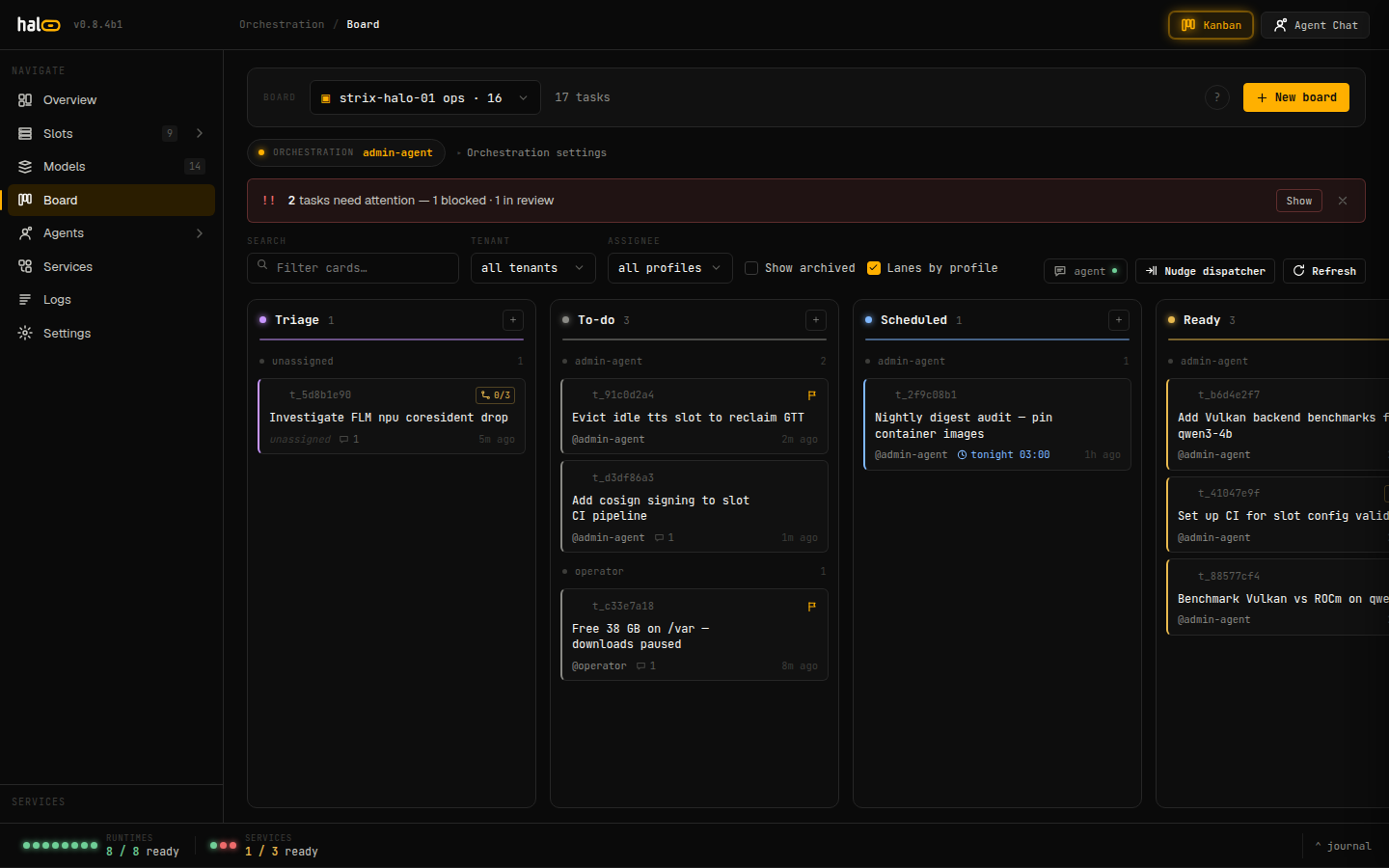
The Operator Board orchestrates agent tasks across lanes (Triage, To-do, Scheduled, Ready, In-progress, Blocked, Review, Done); gated tool calls still pause for human sign-off before they run.
Spending budgets
For agents that can make paid calls (such as routing to an external provider —
hal0’s provider catalog already covers OpenAI, Anthropic, Google AI Studio, and
OpenRouter), each persona can carry a budget. The budget supports per-call,
daily, monthly, and lifetime caps, and a hard_cap flag that decides whether
overshooting is denied or merely logged. Spend is recorded to an append-only
per-persona ledger, and a dedicated check/charge API lets a paid-call path
consult the most-restrictive applicable cap before spending and record the real
charge afterward — the gate a paid-upstream integration needs to avoid an
unbounded bill.
Agent memory
When the memory subsystem is enabled, the agent gets
shared memory tagged with its own identity (a single write can be kept private
with private=true) that it reads and writes through MCP — five tools: memory_add, memory_search, memory_list,
memory_delete, and memory_recall. Because memory is opt-in, the agent’s
memory surface degrades cleanly when it’s off: the per-agent memory stats
simply report as unavailable rather than erroring, so an install without
memory still runs the agent normally.
Where to go next
- Brain: The hal0-brain steward, in full: default model, config, tool routing.
- Memory: The opt-in brain the agent reads and writes.
- Security: Identity, gating, and the auth layer.
- Architecture: Where the agent surfaces sit under the API.