You don’t have to guess which model to run. hal0 ships a curated
catalogue — a hand-picked list of good defaults, each pointing at a
specific GGUF (or safetensors) file in a Hugging Face repo. Pull any of
them by id:
hal0 model pull qwen3.8-27b
The catalogue ships with each release (GET /api/models/catalogue,
backed by code — not a remote manifest), so you can never land on a stale
pick list.
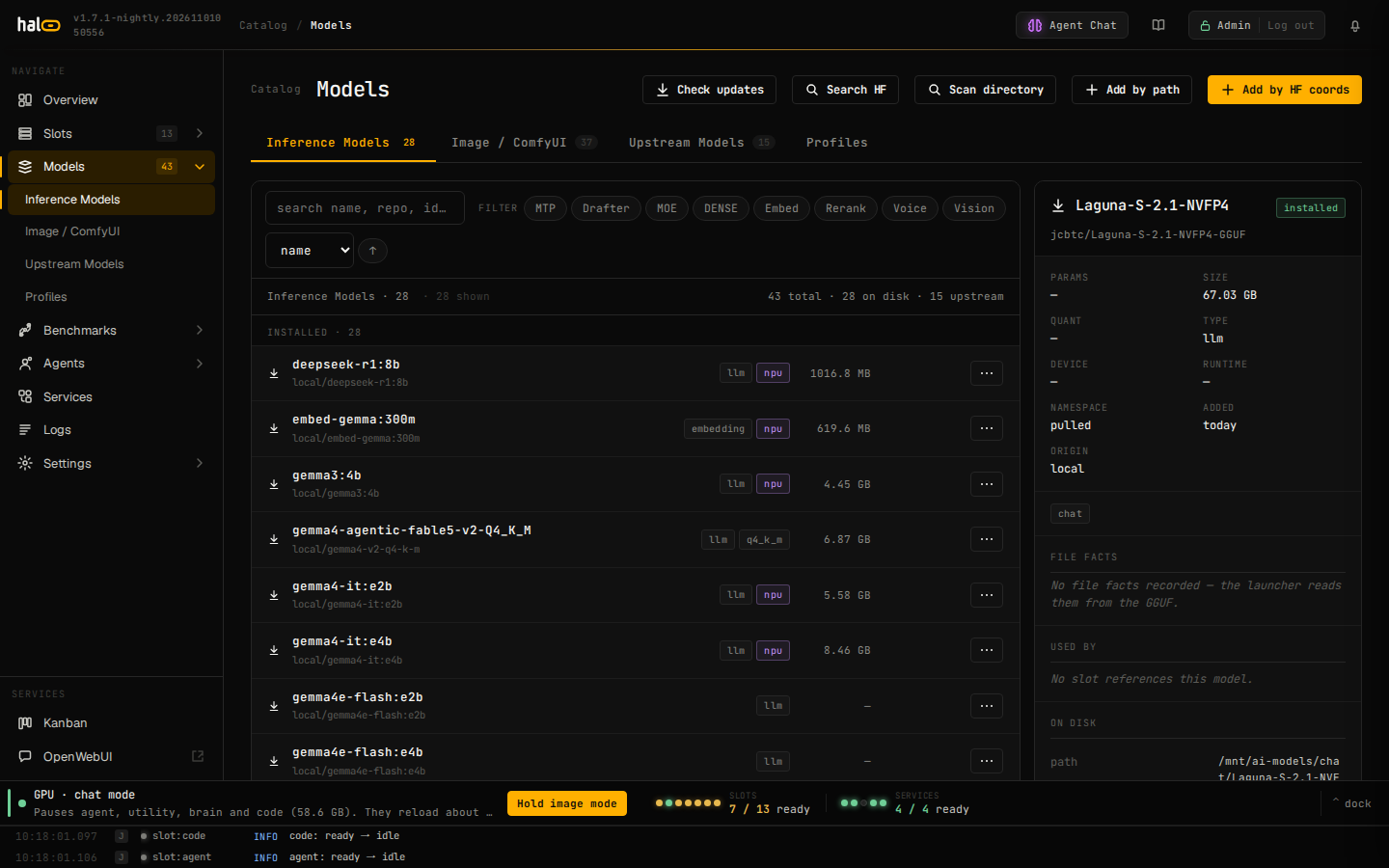
The Models view renders each curated entry as a card with size, license, and minimum-memory badges.
Chat picks
Most headline picks use a Q4-class dynamic quant for the size/quality
sweet spot; sizing is relative — check a card’s memory badge against your
own unified-memory pool before pulling.
| Id | Notes |
|---|---|
qwen3-coder-next |
Frontier coding model; needs a large memory pool. |
qwen3.8-27b |
General-purpose default with MTP, vision and tool calling (Unsloth UD-Q4_K_XL plus the mmproj-F16 vision projector; the catalogue lists a 98,304-token context, and the window a slot runs is its profile’s ctx_size). |
gpt-oss-20b |
OpenAI open-weights 20B. |
qwen3.5-9b |
Lean default; fits alongside embed + voice slots. |
qwen3.5-0.8b |
Tiny; sub-second cold start. |
qwen3-4b |
Fast all-rounder for a small memory budget. |
llama32-3b |
Small and fast; good for low-memory hosts. |
phi3-mini |
Compact reasoning, MIT-licensed. |
Embed and rerank picks
Embed/rerank picks are llama.cpp-compatible GGUFs that run on
gpu-vulkan / gpu-rocm / gpu-cuda / cpu; assign them to an
embedding or reranking slot (--type reranking at
hal0 slot create time — see Manage slots).
Image models
Image models are not in this catalogue or the model registry. They have a
catalog of their own, owned by ComfyUI, and land in its models folder. List
it with hal0 comfyui models list and install a pick with
hal0 comfyui models install <id> — see
Generate images. A pull of an image id answers
422 model.image_asset with that command in its message, and so does adding
a file from ComfyUI’s models folder with hal0 model add. Image models span
the licensing spectrum on purpose (research-only through fully permissive) —
read the license before using output commercially.
The Models view’s Image / ComfyUI tab lists the weight files in that
folder, grouped by what each one is (checkpoints, diffusion models, text
encoders, VAE and so on). A file no catalog model loads, and that is not a
symlink, has a Delete button there; to delete a catalog model’s files, remove
the model with hal0 comfyui models remove <id>.
Filter and sort the catalog
The Models view’s toolbar offers a search box, a row of multi-select
filter chips (OR semantics — pick several to widen the match, none to show
everything), and a sort dropdown (name / size / params / added, either
direction). The filter chips are:
| Chip | Matches |
|---|---|
| MTP | the model’s MTP-heads fact is explicitly on, or the model carries the legacy mtp tag — a plain OR, so the tag still matches even when the fact is explicitly off (see “Vision and MTP” below) |
| MOE | a mixture-of-experts architecture (qwen3next, mixtral, deepseek-moe), or — since no registry row persists architecture yet — the moe/a3b/mtp tag or an a3b token in the id |
| DENSE | neither MTP nor MOE |
| Embed | type === "embedding" |
| Rerank | type === "reranking" |
| Voice | type === "tts" or type === "transcription" |
| Vision | vision in the model’s capabilities |
The backend’s own context-sizing heuristic (a local is_moe variable
inside hal0.hardware.recommend._resolve_primary_ctx, not an importable
symbol) uses a narrower signal than the chip above: it prefers a curated
row’s backfilled architecture field when present, and otherwise falls
back to just the mtp tag or an a3b token in the model id — no moe
tag check. Since no curated row has an architecture backfilled yet,
every row currently falls through to that narrower id/tag heuristic for
context sizing, which is not quite the same rule as the MOE filter chip
above.
The Profiles tab lives alongside Inference / Image / Upstream at the
top of the Models view (#models/profiles) — that’s where you manage the
profiles slots run under. A profile is the whole tune, so its create/edit
form has a field for each part: Context (tokens; empty means the model’s
native window, capped at 32768, or 8192 when the model reports no native
window), Thinking (Default, On or Off; Default is off unless the request
asks), Vision (Auto or Off), Speculation (Auto, Off or N-gram), Flags, and an
optional Runtime. See
Capabilities & profiles for what
each field does and how a launch command is assembled from them.
The Runtime select reads “— Auto · no runtime pinned —” to leave it
unset, or any runtime this box’s registry carries to pin one (the
single-purpose runtimes like Kokoro included, since a profile has no slot
type to narrow the list to one family). A profile that pins a runtime shows a
matching badge on its card. Seed profiles always render the select disabled:
forking a seed copies its runtime binding verbatim, and you change it by
editing the copy. Naming a runtime here does more than set a default flag
bundle — applying the profile to a slot (at create time or from the slot
drawer) also sets that slot’s runtime and, for a single-backend runtime, its
GPU lane. See Manage slots → Dashboard: the slot edit
drawer for what that apply looks like from the
slot side.
The model holds facts; the profile holds the tune
A model’s registry row records facts about its file, and the launch reads
them: path and file set, size, quantization, architecture, the native
context window, the chat template (auto means the template embedded in the
GGUF), the multimodal projector (mmproj), whether the file has MTP heads,
and whether its chat template works with --jinja. Every tune — flags,
context window, thinking default, vision on or off, speculation — belongs
to a profile, and a slot names the profile it runs. To run one model at
two context sizes, or with different sampling, make two profiles and point
each slot at its own; see Capabilities &
profiles.
There’s no dedicated hal0 model edit CLI verb for the facts — set them via
PUT /api/models/{model_id} or, more practically, from the dashboard’s model
drawer. The facts are top-level fields on the model: chat_template,
tokenizer_repo, mtp (the file has MTP heads) and jinja (false when
the file’s template breaks --jinja). A fact you leave out keeps its stored
value, and null clears it:
curl -X PUT http://localhost:8080/api/models/qwen3-4b \
  -H 'Content-Type: application/json' \
  -d '{"chat_template": "chatml", "jinja": false}'
A write that carries a defaults object is refused with
422 model.defaults_removed. A tune (extra_args, context_size,
enable_thinking, vision, profile, …) is refused with
422 model.tune_key_removed; put it on a profile instead.
Curated type-tag chips (mtp / coder / reasoning / vision, ticked on the
old recipe editor) are retired: behavior comes from typed fields — the
model’s MTP-heads fact, capability_flags.tool_calling, the profile’s
enable_thinking, and the capabilities list + mmproj path for vision.
The old tags still exist in the registry as inert, freeform labels; nothing
routes on them anymore, except that the mtp tag is the fallback when the
MTP-heads fact is unset.
Edit a model from the dashboard
Every model row in the Models view carries a kebab (⋮) menu. It has
Edit model settings, which opens the docked model drawer for that row
directly — independent of whichever row is currently selected in the
catalogue list, so you can jump straight from any row to its settings
without first clicking to select it — and, for a row that’s installed and
not an upstream-served model, Delete model…, which removes its
registry entry and, with Also delete files from disk ticked (the
default), its files (the same confirm-by-typing-the-name flow as the
detail pane’s Delete button). Untick the box to keep the files. hal0 then
hides them from future scans so the model doesn’t come back. The row’s detail pane also has an Edit
options button that opens the same drawer for whichever row is currently
selected.
The same drawer opens from a slot card’s pencil icon (see
Manage slots: the dashboard drawer, which covers the inline
model-edit pencil) for whichever model is currently bound to that slot —
same drawer, two entry points.
The drawer edits facts only. It is organized top to bottom as:
- Display name — what the dashboard shows; empty keeps the model id.
- Default for
<type>— a badge plus a Set/Remove toggle for the
per-type default marker (see below). - A facts band — quant, size, architecture, a short sha256, and the slots
that use the model, each a link to its slot drawer. - File facts — the Chat template picker (
autouses the template
embedded in the GGUF), an overrides ledger for MTP heads (does this
file carry MTP heads) and Jinja (does its chat template work with
--jinja), a read-only capabilities readout — the model’s registry
capabilities (pull metadata / auto-detect) — and the read-only Native
context window. In the ledger, Auto is invisible: only an explicit On or
Off shows as a chip, set with “+ Override…” and cleared with ✕. As of #2193
capabilities have no chip-editing UI anywhere in the drawer; see “Vision and
MTP” below for how a pulled model picks upvisionin the first place. - Runner compatibility — the Engine that serves the model, and the
read-only Runs on lanes, computed from the architecture and the runner
catalogue. - Source · re-pull coords — MMProj sidecar path (editable; gated by
the vision↔mmproj invariant below), HF repo, HF filename, and the read-only
paths.
A note at the top of the drawer says where the rest went: flags, context
window, thinking, vision and speculation are set on a profile, and a slot
picks the profile.
Saving writes only the fields that changed. The drawer’s footer warns that
changes require the slot to restart to take effect, and the Save button stays
disabled until something is actually dirty.
Vision and MTP
Whether the projector loads is the profile’s vision setting: auto loads
the model’s mmproj sidecar whenever the model carries one; off never
loads it, even on a vision-capable model (frees roughly 0.9 GB of resident
VRAM). Capabilities — including vision — are read-only in the model drawer;
they come from the registry row, not from anything hand-ticked there. A model
whose capabilities already include vision still needs a non-empty mmproj
path to save — clearing the path blocks save with an inline error. What
changed under #2193 is how a pulled model picks up vision in the first
place: the Add-from-HF modal’s projector picker offers any mmproj sidecar the
repo ships (auto-preselected, with a “None — text only” option), and the
vision label is derived automatically from that choice — there’s no
separate hand-ticked vision toggle in that flow anymore.
MTP has two halves. The model records the fact — MTP heads in the
drawer’s ledger is a tri-state: an explicit On or Off wins in either
direction over the registry’s legacy mtp tag, and leaving it at Auto falls
back to that tag when present. There is no filename-based MTP sniff — an
uncurated pull with neither the tag nor an explicit fact has no heads as far
as hal0 knows. Whether a slot uses the heads is the profile’s speculation
(auto, off or ngram). A model can also carry a paired drafter file, which
auto prefers over the heads; see
Drafters. The Models list’s MTP filter chip is a plain OR of the
explicit fact being On and the legacy tag (ui/src/dash/model-sort.js), so a
model tagged mtp still shows the chip even when its fact is explicitly Off.
Per-type default
“Default for <type>” marks the model that its dispatcher type
(llm/embedding/reranking/…) falls back to. At most one model per
type can hold it — promoting one demotes whichever model currently holds
it. Set or clear it from the drawer, or from the CLI:
hal0 model default qwen3.8-27b          # promote (demotes the current holder)
hal0 model default qwen3.8-27b --clear  # clear — the type is left with no default
How model fit is evaluated
Before a model is assigned to a slot, hal0 checks that the model’s
classified modality matches the slot type (chat → llm, embed →
embedding, and so on), that the model id actually resolves in the local
registry, and that the slot’s device suits the slot’s profile (a
single-purpose engine, such as an FLM profile, needs a matching device). A
hard mismatch blocks the assignment, with the reason surfaced in the
dashboard. This is why the device you pick for a slot has to stay
consistent with what you assign to it — see
Manage slots for --hardware.
Off-catalogue models
Anything not in the catalogue still works — search Hugging Face, inspect
a repo’s variants, and pull by coordinates. See
Pull and register models.